
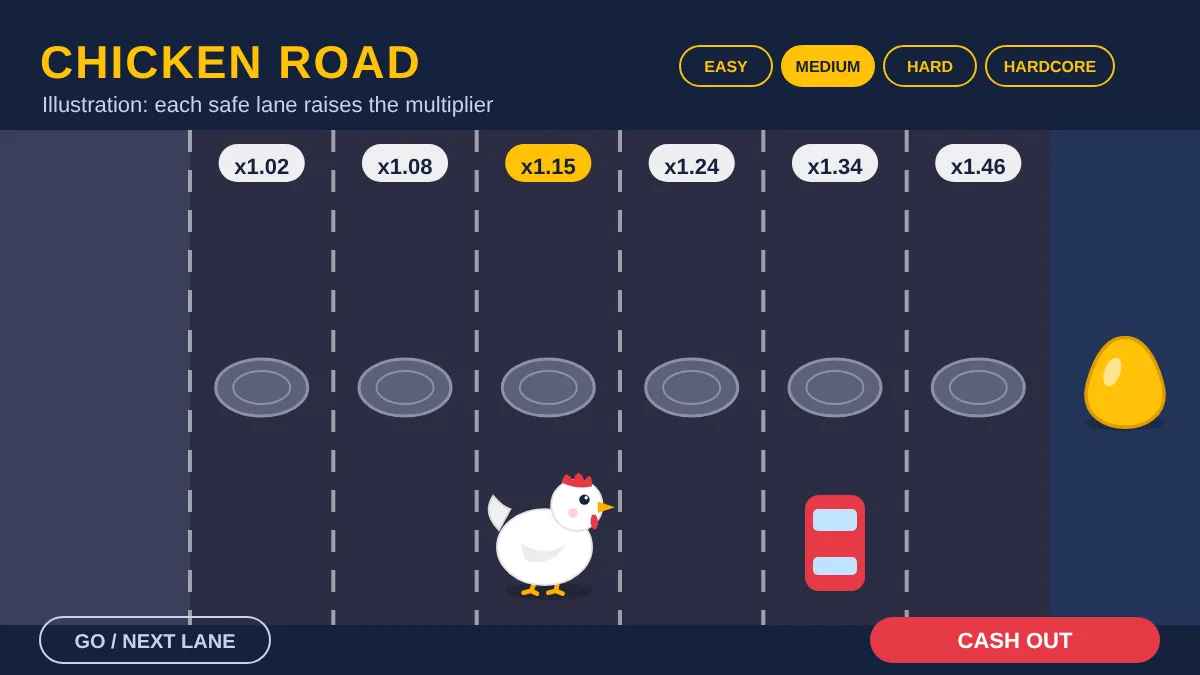
What the Chicken Road demo is
The Chicken Road demo, often searched as "chicken road free play" or "chicken road demo play", is the same game InOut Games supplies to casinos, switched to a mode that uses virtual credits instead of money. The hen, the lanes, the four difficulty modes and the cash-out button all work exactly as they do in real play. The only difference is that nothing you win or lose is real.
That makes the demo the most useful tool available to a new player. You can see how the multiplier grows, how quickly Hardcore rounds end, and how it actually feels to decide between cashing out and taking one more step, all before you open an account anywhere. Because the game is server-based and random, the demo cannot teach you how to win; what it can teach you is how the game behaves and whether you enjoy it. For the bigger picture, start with the Chicken Road overview for Canada.
How to play Chicken Road free, no registration
There are two easy routes. The first is the provider's own game page, which hosts a free demo you can launch straight from your browser. The second is a casino lobby: many casinos offer a "demo" or "play for fun" button on the game tile, sometimes without logging in, though some regulated Canadian sites may ask you to sign in first.
- Open the official InOut Chicken Road page or a casino lobby you already trust.
- Launch the demo; you receive a virtual balance automatically.
- Set a stake and choose Easy, Medium, Hard or Hardcore.
- Click through lanes and cash out whenever you like.
You never need to enter card details, Interac information or ID to use a genuine demo. If a site asks for payment or personal data before showing you a "free" game, that alone is a reason to leave.
What you can test in the demo
The difficulty setting is the most important choice in Chicken Road, and the demo is the place to understand it. Game databases such as SlotCatalog list these figures for the original game. They are third-party data, so compare them with the info panel; there is a separate note on how game data is verified.
| Mode | Lanes | Risk per step | What to watch |
|---|---|---|---|
| Easy | 24 | About 1 in 25 | Slow, steady multiplier growth |
| Medium | 22 | About 3 in 25 | How often mid-range rounds end |
| Hard | 20 | About 5 in 25 | How fast a balance swings |
| Hardcore | 15 | About 10 in 25 | How rarely deep runs happen |
Play a decent number of rounds in each mode rather than a handful. A few lucky Hardcore runs can give a very wrong impression, while fifty or a hundred rounds start to show how often the hen actually gets fried. Notice your own reactions too: if you keep wanting "one more step", that is useful information about how you might behave with real money.
Read the info panel while you are there. The rules screen shows the provider name, the declared RTP and often the bet range and max win. Getting used to finding it in the demo makes it easy to check the same details at any casino later.
Chicken Road demo on mobile
Chicken Road is built in HTML5, so the demo runs in Safari, Chrome or any modern mobile browser on iPhone and Android without downloading anything. The layout adapts to portrait screens, and the controls are simply taps. If you plan to play on your phone for real later, test the demo on the same phone first: check that the buttons are comfortable and that you can always see your balance and the current multiplier clearly.
You do not need an app for the demo. Any "Chicken Road demo app" from an unfamiliar developer is very likely one of the clones discussed below, not the InOut game.
What to test before betting real money
Use the demo as a rehearsal, not as a hunt for patterns. Try your planned stake size relative to your planned budget and see how long that budget lasts in each mode. Practise setting a cash-out target before each round, for example 2x on Medium, and see whether you can actually stick to it. Try a stop rule as well: end the session after a fixed number of rounds or a fixed loss, even when it is going well.
If you find the demo boring on Easy and stressful on Hardcore, that tells you where your comfort zone sits. If you find it hard to stop even with play money, that is worth taking seriously before you deposit anything. The responsible gambling page has practical limit tools.
Demo vs real money: what changes
The math should be the same, but a few practical things are different once money is involved:
| Aspect | Demo | Real money |
|---|---|---|
| Account needed | Usually no | Yes, with ID checks |
| Balance | Virtual credits | Your CAD deposit |
| Winnings | Not withdrawable | Withdrawable after KYC |
| Max win and bet range | Demo defaults | Set by the casino |
| Emotional pressure | Low | Much higher |
The last row matters most. Decisions that feel easy with fake credits feel very different when each step risks your own dollars. Expect to be more tempted to chase or to push one lane further, and plan for it.
Chicken Road 2 demo
The sequel, Chicken Road 2.0, also has a free demo. It uses longer lanes per mode and a lower declared RTP of about 95.5%, so it behaves differently from the original even though it looks similar. If you are curious, test both side by side. The Chicken Road 2 page compares the two in detail.
Fake Chicken Road demo sites and apps
The game's popularity has attracted plenty of imitators. Some websites and store apps use the Chicken Road name and artwork but run their own games, with no connection to InOut Games. Some are harmless arcade copies. Others use a "free demo" as bait to collect phone numbers, push you into a Telegram group, or steer you toward an unlicensed deposit site.
Red flags for fake demos: a download is required, the provider is not named as InOut Games, you are asked for payment or personal details to "unlock" play, or the "demo" promises a predictor or guaranteed strategy. A genuine demo needs none of these.
When in doubt, use the official provider page or the lobby of a casino licensed for your province, and confirm the provider name in the info panel. The Chicken Road Canada overview shows how to check a licence.
Moving from demo to real money
If you decide to play for real, do it in a measured way. Pick a site regulated for your province (Canada is not on InOut's restricted-countries list, but provincial rules apply), verify your account, set deposit and time limits, and start on Easy at the lowest stake. Keep the habits you practised in the demo: a fixed budget, a cash-out target per round and a firm stop point. The payments page explains Interac deposits, withdrawals and verification.
Chicken Road demo FAQ
Is the Chicken Road demo free?
Yes. The genuine demo uses virtual credits and costs nothing. You do not need to deposit or enter payment details. If a site asks for money or card information to play a "free" demo, it is not the real demo and you should leave.
Do I need to register to play the demo?
On the provider's official page, no. Some casino lobbies also allow demo play without logging in, while some regulated Canadian sites may ask you to sign in first. Either way, a real demo never requires a deposit.
Is the demo the same as the real game?
It runs the same InOut software, modes and cash-out mechanic, with play money instead of real money. Bet limits and the maximum win in real play are set by each casino, so check the info panel when you switch.
Can I win real money in the demo?
No. Demo winnings are virtual and cannot be withdrawn. Real winnings are only possible with real stakes at a licensed operator, and even then no round is guaranteed because outcomes are random.
Does practising in the demo improve my odds?
No. Each step is random, so practice cannot change the result. What the demo can improve is your discipline: understanding volatility, sticking to cash-out targets, and knowing when to stop.
Can I play the demo on my phone?
Yes. The game is HTML5 and runs in any modern mobile browser on iPhone or Android, with no download. Avoid apps calling themselves a Chicken Road demo unless they come from a licensed operator you already use.
Is there a Chicken Road 2 demo?
Yes, the sequel has a free demo too. Its lanes, multipliers and declared RTP of about 95.5% differ from the original, so test it separately rather than assuming it plays the same way.